I recently needed a query to look into the current query plan cache and locate all actual data access operators (index scans, index seeks, table scans). This is the query I used, I decided to place it here if someone else find it useful and, more importantly, so that I can find it again when I needed it:
Read the rest of this entry »
Posted in Samples, Troubleshooting | Comments Off on Show all index and heap access operators in the plan cache
You probably can easily answer a question like ‘What columns does this table have?’. Whether you use the SSMS object explorer, or sp_help, or you query sys.column, the answer is fairly easy to find. But what is I ask ‘What are the physical columns of this table?’. Huh? Is there any difference? Lets see.
At the logical layer tables have exactly the structure you declare it in your CREATE TABLE statement, and perhaps modifications from ALTER TABLE statements. This is the layer at which you can look into sys.columns and see the table structure, or look at the table in SSMS object explorer and so on and so forth. But there is also a lower layer, the physical layer of the storage engine where the table might have surprisingly different structure from what you expect.
Inspecting the physical table structure
To view the physical table structure you must use the undocumented system internals views: sys.system_internals_partitions and sys.system_internals_partition_columns:
Read the rest of this entry »
Posted in CodeProject, Samples, Troubleshooting, Tutorials | Comments Off on SQL Server table columns under the hood
Certain SQL Server query execution operations are calibrated to perform best by using a (somewhat) large amount of memory as intermediate storage. The Query Optimizer will choose a plan and estimate the cost based on these operators using this memory scratch-pad. But this is, of course, only an estimate. At execution the estimates may prove wrong and the plan must continue despite not having enough memory. In such an event, these operators spill to disk. When a spill occurs, the memory scratch-pad is flushed into tempdb and more data is accommodated in the (now) free memory. When the data flushed to tempdb is needed again, is read from disk. Needless to say, spilling into tempdb is order of magnitude slower than using just the memory scratch-pad. Monitoring for spilling is specially important in ETL jobs, since these occurrences may cause the ETL job to stretch for many more minutes, sometimes even hours. For an exhaustive discussion of ETL, including some references to spills, see The Data Loading Performance Guide.
Read the rest of this entry »
Posted in Troubleshooting, Tutorials | Comments Off on Understanding Hash, Sort and Exchange Spill events
Prior to SQL Server 2012 when you add a new non-NULLable column with default values to an existing table a size-of data operation occurs: every row in the table is updated to add the default value of the new column. For small tables this is insignificant, but for large tables this can be so problematic as to completely prohibit the operation. But starting with SQL Server 2012 the operation is, in most cases, instantaneous: only the table metadata is changed, no rows are being updated.
Lets look at a simple example, we’ll create a table with some rows and then add a non-NULL column with default values. First create and populate the table:
Read the rest of this entry »
Posted in Announcements, CodeProject, Samples, SQL 2012, Troubleshooting, Tutorials | Comments Off on Online non-NULL with values column add in SQL Server 2012
A new error started showing up in SQL Server 2008 SP2 installations:
The database cannot be opened because it is version 661. This server supports version 662 and earlier. A downgrade path is not supported.
661 sure is earlier than 662, so what seems to be the problem? This error message is a bit misleading. SQL Server 2008 supports database version 655 and earlier. But with support for 15000 partitions in SQL Server 2008 SP2, databases enabled for 15000 partitions are upgraded to version 662. This upgrade is necessary to prevent an SQL Server 2008 R2 instance from attaching a database that has more than 1000 partitions in it, since the code in R2 RTM does not understand 15000 partitions and the effects would be unpredictable. So SQL Server 2008 SP2 does indeed support version 662, but it does not support version 661. This behavior is explained in the Support for 15000 Partitions.docx document, although the database versions involved are not explicitly called out.
So the error message above should be really read as:
The database cannot be opened because it is version 661. This server supports versions 662, 655 and earlier than 655. A downgrade path is not supported
With this information the correct resolution can be achieved: the user is trying to attach a SQL Server 2008 R2 database (v. 661) to an SQL Server 2008 SP2 instance. This is not supported. User has to either upgrade the SQL Server 2008 SP2 instance to SQL Server 2008 R2, or it has to attach the database back to a R2 instance and copy out the data from the database into SQL Server 2008 instance database, eg. using the Import and Export Wizard.
Posted in Announcements, Troubleshooting | Comments Off on This server supports version 662 and earlier…
In a stackoverflow.com question the user has asked how come a SELECT statement could own a U mode lock?
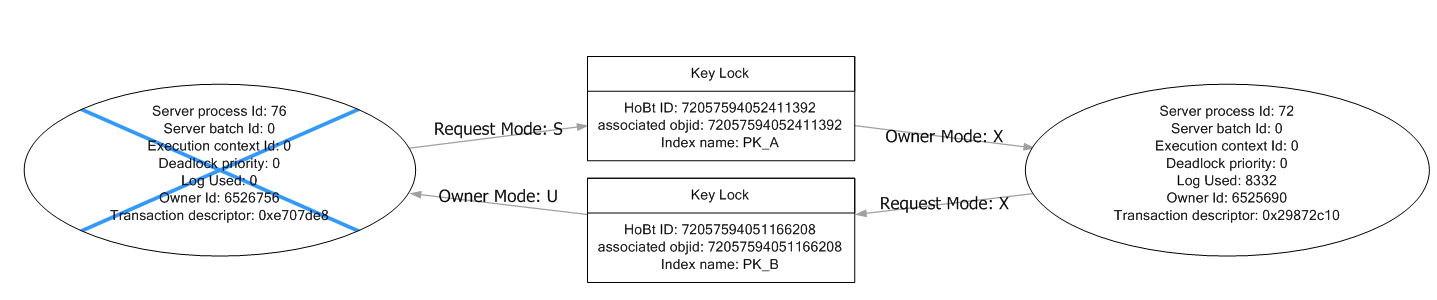
S-U-X deadlock graph
The deadlock indeed suggests that the deadlock victim, a SELECT statement, is owning an U lock on the PK_B index. Why would a SELECT own an U lock? The query had no table hints and was a standalone query, not part of a multi-statement transaction that could had aquired the U lock in previous staements.
Turns out that the SELECT was actually not owning any U lock. The deadlock graph files (the *.xdl files) are in fact XML files and they can be opened as XML and inspected, for a little more detail than the visual deadlock graph visualizer permits. Here is the actual resource list in the deadlock XML:
<resource-list>
   <keylock hobtid="72057594052411392" dbid="10"
         objectname="A" indexname="PK_A" id="lock17ed4040"
        mode="X" associatedObjectId="72057594052411392">
    <owner-list>
     <owner id="process4f5d000" mode="X"/>
    </owner-list>
    <waiter-list>
     <waiter id="processfa3c8e0" mode="S" requestType="wait"/>
    </waiter-list>
   </keylock>
   <keylock hobtid="72057594051166208" dbid="10"
        objectname="B" indexname="PK_B" id="lock22ea3940"
        mode="U" associatedObjectId="72057594051166208">
    <owner-list>
     <owner id="processfa3c8e0" mode="S"/>
    </owner-list>
    <waiter-list>
     <waiter id="process4f5d000" mode="X" requestType="convert"/>
    </waiter-list>
   </keylock>
  </resource-list>
As you can see, the resource lock22ea3940 is owned by the process processfa3c8e0 (the SELECT) indeed, but is owned in S mode. The process process4f5d000 (the UPDATE) is requesting this resource for a convert from U to X mode. So the true deadlock is like this:
- SELECT owns a lock on the row in PK_B in S mode
- SELECT wants a lock on the row in PK_A in S mode
- UPDATE owns a lock on the row in PK_A in X mode
- UPDATE also owns a U lock on the PK_B row. (S and U modes are compatible)
- UPDATE is requesting a convert of the U lock it has on the row on PK_B to X mode
As you can see, there is no mysterious U lock owned by the SELECT. There is an U lock on the row in PK_B, but is owned by the UPDATE, which is requesting a convert to X for it. The fact that the resource is showned in the deadlock graph viewer in SSMS as being ‘Owner mode: U’ and pointing to the SELECT is simply an artifact of how SSMS displays the deadlock graph.
The lesson to take home is that the visual graphic deadlock graph display is usefull only to have a cursory glance at the deadlock cycle. The true meat and potatoes are in the XML, which has a lot more information. Not to mention that the information in the XML is actually correct, which helps investigation…
Posted in Troubleshooting | Comments Off on The puzzle of U locks in deadlock graphs
The SQL Server 2008 R2 Express editions has increased the database size limit to 10Gb from the previous limit of 4Gb. This is great news for many developers, as the 4Gb limitation was by far the most difficult barrier preventing Express adoption. With today’s rate of generating data, the 4Gb limit was just plain small.
All the other limitations of SQL Server Express stay in place:
- CPU
- SQL Server Express only uses once CPU socket. It will use all cores and any Hyper-Threading logical processor in that socket though.
- Memory
- SQL Server Express limits the size of the data buffer pool to 1Gb.
- Replication
- SQL Server Express can only participate as a subscriber in a replication topology.
- Service Broker
- Two SQL Server Express instances cannot exchange Service Broker messages directly, the messages have to be routed through a higher level SKU.
- SQL Agent
- SQL Server Express does not have an Agent service and as such it cannot run Agent scheduled jobs.
Posted in Troubleshooting | 1 Comment »
Some say performance troubleshooting is a difficult science that blends just the right amount of patience, knowledge and experience. But I say forget all that, a few bullet points can get you a long way in fixing any problem you encounter. Is more important to find a google SEO friendly result that gives simplistic advice. Most importantly, good advice never contains the words ‘It depends’. Without further ado, here is my bulletproof SQL Server optimization guide:
- Always trust your gut feeling. Avoid doing costly and unnecessary measurements. They may lead down the treacherous path of the scientific method. A gut feeling is always easier to explain and this improves communication. Measurements require use of complicated notions not everybody understands, so they lead to conflicts in the team.
- High CPU utilization is caused by index fragmentation. Because the distance between database pages increases, the processor needs more cycles to reference the pages in the buffer pool.
- Low CPU utilization is caused by index fragmentation. As the index fragments get smaller, they fit better into the processor L2 cache and this results in fewer cycles needed to access the row slots in the page. Because the data is in the cache the processor idles next cycles, resulting in low CPU utilization.
- High Avg. Disk Sec. per Transfer is caused by index fragmentation. When indexes are fragmented the disk controller has to reorder the IO scatter-gather requests to put them in descending order. Needles to say, this operation increases the transfer times in geometric progression, because all the commercial disk controllers use bubble sort for this operation.
- High memory consumption is caused by index fragmentation. This is fairly trivial and well known, but I’ll repeat it here: as the number of index fragments increases more pointers are needed to keep track of each fragment. Pointers are stored in virtual memory and virtual memory is very large, and this causes high memory consumption.
- Syntax errors are caused by index fragmentation. Because the syntax is verified using the metadata catalogs, high fragmentation in the database can leave gaps in the syntax. This is turn causes the parser to generate syntax errors on perfectly valid statements like SECLET and UPTADE.
- Covering indexes can lead to index fragmentation. Covering indexes are the indexes used by the query optimizer to cover itself in case the plan has execution faults. Because they are so often read they wear off and start to fragment.
- Index fragmentation can be resolved by shrinking the database. As the data pages are squeezed tighter during the shrinking, they naturally realign themselves in the correct order.
There you have it, the simplest troubleshooting guide. Since most performance problems are caused by index fragmentation, all you have to do is shrink the database to force the pages to re-align correctly, and this will resolve the performance problem.
Happy April 1st everyone!
Posted in Troubleshooting | 1 Comment »
select instance_name as [Deprecated Feature] ,
	cntr_value as [Frequency Used]
	from sys.dm_os_performance_counters
	where object_name = 'SQLServer:Deprecated Features'
	and cntr_value > 0
	order by cntr_value desc;
Quick way to tell which deprecated feature are used on a running instance of SQL Server. The performance counters reset at each server start up, so the interogation is relevant only after the server was up for some time. This will not tell you where is the usage comming from, but will give you a very quick idea what deprecated features are used most frequently by your apps.
If the SQL Server is a named instance, you have to query the proper counter category: 'MSSQL$<instancename>:Deprecated Features'
Posted in Troubleshooting | Comments Off on What deprecated features am I using?
Irrelevant of the size of the RAM, you still need a pagefile at least 1.5 times the amount of physical RAM. This is true even if you have a 1 TB RAM machine, you’ll need 1.5 TB pagefile on disk (sounds crazy, but is true)
When a process asks for MEM_COMMIT memory via VirtualAlloc/VirtualAllocEx, the requested size needs to be reserved in the pagefile. This was true in the first Win NT system, and is still true today see Managing Virtual Memory in Win32:
When memory is committed, physical pages of memory are allocated and space is reserved in a pagefile.
Bare some extreme odd cases, SQL Server will always ask for MEM_COMMIT pages. And given the fact that SQL uses a Dynamic Memory Management policy that reserves upfront as much buffer pool as possible (reserves and commits in terms of VAS), SQL Server will request at start up a huge reservation of space in the pagefile. If the pagefile is not properly sized errors 801/802 will start showing up in SQL’s ERRORLOG file and operations.
This always causes some confusion, as administrators erroneously assume that a large RAM eliminates the need for a pagefile. In truth the contrary happens, a large RAM increases the need for pagefile, just because of the inner workings of the Windows NT memory manager. Although reserved pagefile is, hopefully, never used, the problem of reserving such a huge pagefile file can be quite serious and needs to be accounted for during capacity planning.
Posted in Troubleshooting | 6 Comments »