Understanding Queue Monitors
August 3, 2008A major class of Service Broker applications have nothing to do with the distributed application capabilities SSB was designed for. Instead they leverage SSB’s capability to run a stored procedure outside the context of the user connection. This capability enables to schedule execution and don’t wait for it to finish, or to schedule multiple procedures to execute in paralel. Often the developers that use these capabilities don’t care for the reliable message delivery SSB offers and many see the complex infrastructure of message types, contracts and services as a mere hurdle. Nonetheless sooner or later they have to troubleshoot an issue and then is when many of you find my blog and my articles. Troubleshooting activated procedure is not difficult, but one simply has to know where to look and what to look for.
In this entry I want to shed some light in the soul that drives the activation process: the Queue Monitors.
A Queue Monitor is a state machine that resides in the SQL Server and decides when to launch a new instance of activated procedure into execution. The <span style="color: green">sys.dm_broker_queue_monitors</span> DMV is used to view the Queue Monitors:
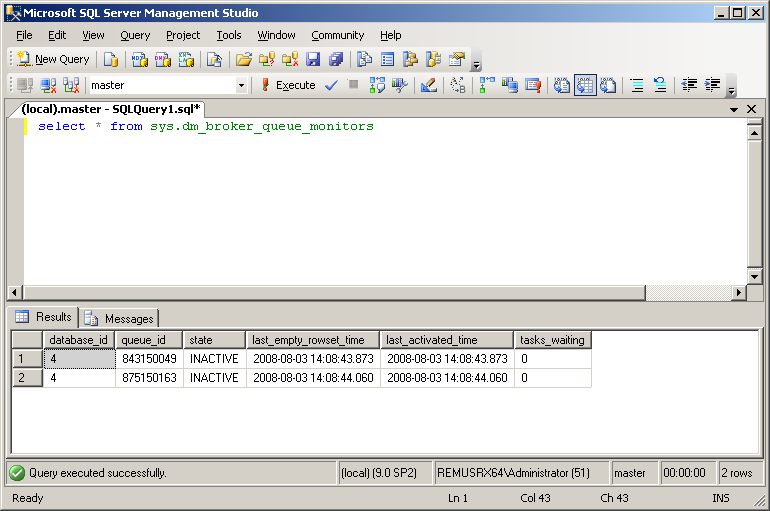
This DMV is described in BOL at http://msdn.microsoft.com/en-us/library/ms177628.aspx where the columns types and decriptions can be found.
There is a Queue Monitor for each queue with activation enabled in the SQL Server instance. The DMV does not contain the database name nor the queue name, but you can join with <span style="color: green">sys.service_queues</span> on queue_id to get the queue names. Note that even when you run this query on a brand new install of SQL Server you will get two Queue Monitors: InternalMailQueue and ExternalMailQueue. These are the queues placed in msdb used by the Database Mail feature of SQL Server.
Queue Monitor States
To start troublesooting an activation problem you need to understand the Queue Monitor states:
<span style="color: Green">INACTIVE</span>: there are no messages available to be received in the monitored queue.<span style="color: Green">NOTIFIED</span>: messages are available and the activated procedure was launched into execution.<span style="color: Green">RECEIVES_OCCURING</span>: the activated procedure is issuing<span style="color: Blue">RECEIVE</span>command against the monitored queue.
The important thing to notice here is that the Queue Monitor will go into <span style="color: Green">NOTIFIED</span> state when an activated procedure was launched and will not launch again any procedure until a <span style="color:Blue">RECEIVE</span> statement is issued against the monitored queue. This is done in order to prevent situations when a queue is incorrectly configured and launches the wrong stored procedure into execution. Altough in practice is the activated procedure that is expected to execute the <span style="color: Blue">RECEIVE</span> statement, this is not enforced by the Queue Monitor. Any connection that executes a <span style="color: Blue">RECEIVE</span> while the Queue Monitor is in <span style="color: Green">NOTIFIED</span> state will cause the Queue Monitor to enter the <span style="color: Green">RECEIVES_OCCURING</span> state.
This activation state machine also handles sending the QUEUE_ACTIVATION events for Event-Based Activation. The only difference that instead of launching a stored procedure into execution the Queue Monitor sends a message of type <span style="color:Green">http://schemas.microsoft.com/SQL/Notifications/EventNotification</span> to the notification subscriber. Again, same as with internal activation, once the notification is sent the Queue Monitor enters the <span style="color: Green">NOTIFIED</span> state and will not send more notifications messages until a <span style="color: Blue">RECEIVE</span> statement is executed on the monitored queue.
The Queue Monitor will go back to <span style="color: Green">INACTIVE</span> state when there are no more messages ready to be received in the queue.
Queue Monitor Timers
The Queue Monitors are also responsible for handling the activation ramp up for handling a higher load by launching more instances of the activated procedure. Once the Queue Monitor enters the <span style="color: Green">RECEIVES_OCCURING</span> state (ie. a <span style="color:Blue">RECEIVE</span> statement is issued) it will start an internal timer. Each time a <span style="color:Blue">RECEIVE</span> statement on the monitored queue returns an empty rowset this timer is reset. If this timer ever reaches a threshold then a new instance of the activated procedure is launched. The reasoning behind this mechanism is that activated procedures are supposed to issue <span style="color:Blue">RECEIVE</span> statements and process the received messages. If <span style="color:Blue">RECEIVE</span> does not find any available messages and returns an empty rowset the activation timer is reset because it means that there are no messages available for receive, so there is no reason to launch a new instance of the procedure. The timer threshold is 5 seconds and currently is hardcoded.
This timers are also used for sending new QUEUE_ACTIVATION event messages if the Event-Based Activation is used instead of internal activation.
Troubleshooting
If you find yourself looking at Queue Monitors in <span style="color: Green">sys.dm_broker_queue_monitors</span> is usualy because of one reason: your activated procedure is failing to launch.
If there is no record for your queue in <span style="color: Green">sys.dm_broker_queue_monitors</span> then this indicates that the Service Broker activation is not even monitoring the queue. For activation to monitor the queue several settings have to be properly configured:
- The queue has to be enabled. Check
is_receive_enabledandis enqueue_enabledin<span style="color: green">sys.service_queues</span>. - Activation has to be enabled on the queue. Check
is_activation_enabledin<span style="color: green">sys.service_queues</span>. - Activation has to be properly configured. Check
activation_procedure,max_queue_readersandexecute_ss_principal_idin<span style="color: green">sys.service_queues</span>. - The Service Broker in the database has to be enabled. Check
is_broker_enabledin<span style="color: green">sys.databases</span>.
If there is a record for your queue in <span style="color: Green">sys.dm_broker_queue_monitors</span> and its state is <span style="color: Green">INACTIVE</span> then there are no messages in the queue ready to be received. Check the content of the queue with a <span style="color:Blue">SELECT</span> * <span style="color:Blue">FROM</span> <span style="color:Green">[<your_queue_name>]</span>. Messages ready to be received have to be unlocked and the status has to be 1 <span style="color:Green">ready</span>. Note that the BOL documentation of RECEIVE erroneously shows the state 0 as <span style="color:Green">ready</span>, which is incorrect.
If the Queue Monitor for your queue is in <span style="color: Green">NOTIFIED</span> and it stays in that state is an indication that your activated procedure is not issuing the correct <span style="color:Blue">RECEIVE</span> statement. Check your activated procedure. Note that if you change the procedure the Queue Monitor will not detect this change and launch again the procedure. The easiest thing to do is to recycle the Queue Monitor by disabling and then enabling activation on the queue:
<br />
<span style="color: Blue">ALTER QUEUE</span> [<span style="color: Green"><your_queue></span>] <span style="color: Blue">WITH ACTIVATION (STATUS = OFF)</span>;<br />
<span style="color: Blue">ALTER QUEUE</span> [<span style="color: Green"><your_queue></span>] <span style="color: Blue">WITH ACTIVATION (STATUS = ON)</span>;
Finally if the Queue Monitor for your queue is in the state RECEIVES_OCCURING then it indicates that the <span style="color:Blue">RECEIVE</span> statement is being issued against the queue. Make sure your assesment that the procedure is not being launched is correct. Check if there are other applications or procedures that are erroneously receiving from your queue.
Demo Caution
I will end with a cautionary tale. I was at a presentation where the speaker was showing a very nice monitoring facility he had built around the event notifications for DDL that he was using to monitor a farm of SQL Server instances. As he was making his way through the demo, he showed how it attaches a stored procedure to the queue to monitor for the notification messages. But in order to not perturb the presentation flow (at moment focused on setting up activation) he did not create the whole procedure, just a stub for it. Something like this:
<br />
<span style="color: Blue">CREATE PROCEDURE</span> usp_NotificationProcessor<br />
<span style="color: Blue">AS<br />
BEGIN</span><br />
	<span style="color:Green">--TODO: add code here</span><br />
<span style="color: Blue">END</span>;<br />
The speaker then continued with his demo and attached the procedure to the queue for activation. Now since he had already created the subscription for all DDL events on the demo database, his queue was receiving the notification messaged as he was creating and altering objects in the database.
He finaly reaches the point when he changes the stub procedure to actually process the notifications and then the audience eagerly awaits the results. And nothing happens.
Can you guess what was wrong? Go back and read this for a hint.
Since activation was enabled and there were messages to received, the Queue Monitor has launched the procedure altough it was nothing but a stub. The Queue Monitor has entered the <span style="color: Green">NOTIFIED</span> state and would not launch again the procedure until a <span style="color:Blue">RECEIVE</span> was issued. Later when the stub procedure was changed to do the actual processing, the procedure would not be launched by the Queue Monitor because it would still wait for <span style="color:Blue">RECEIVE</span>. This can be easily fixed by turning activation on the queue off and back on, as I showed before.